The monthly EFT can be either a net deposit or net deduction, depending on whether the local church processes their own donations, and whether expenses exceed the donations processed by the home office, like credit cards or all donations for those churches who pay the additional fee for the home office to do processing. The best way to explain this is to give a couple of examples along with the instructions for entering the examples.
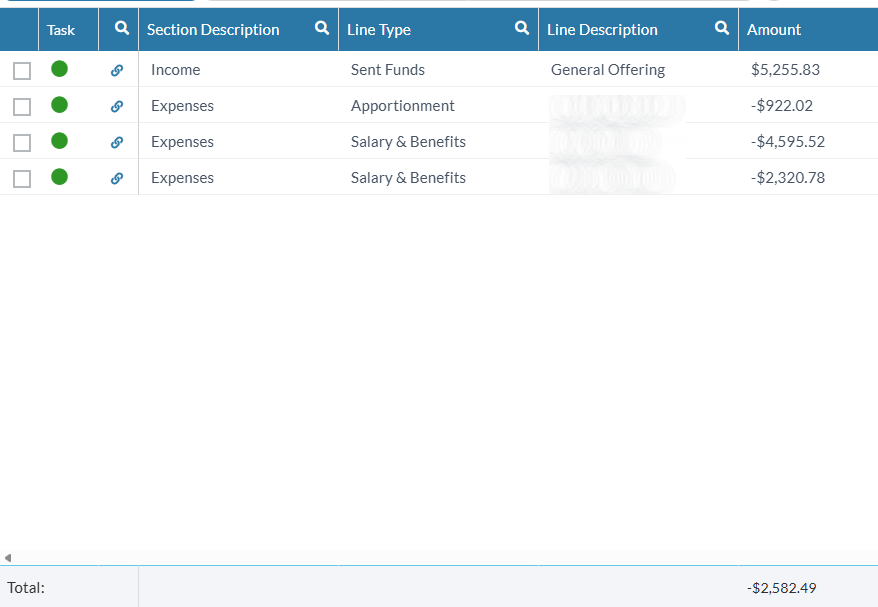
This first example, as you can see by the last line in the EFT report is a net deduction. This means that it is recorded as a payment with appropriate split information recorded so that reporting is accurate. We understand that recording income as negative and expenses as positive may be counterintuitive. Nevertheless, that is the way to record this transaction.
- Click on the checking account from which the deduction is taken.
- Select the date of the EFT transaction.
- Describe the entry, like “August EFT”.
- Put the net deduction amount in the Payment column.
- Click the gear icon

- Click “Split”
- Record the Income section as negative numbers to the appropriate category. In this case, the category is Personal Income: Donations and the amount is -5255.83.
- Record the Expenses section as positive numbers to the appropriate categories. In this case, Personal Expenses: Apportionment for 922.02 and Salary and Benefits for 4595.52 and 2320.78.
- Click OK to save the split.
- Press Enter save the transaction.
Now another example:
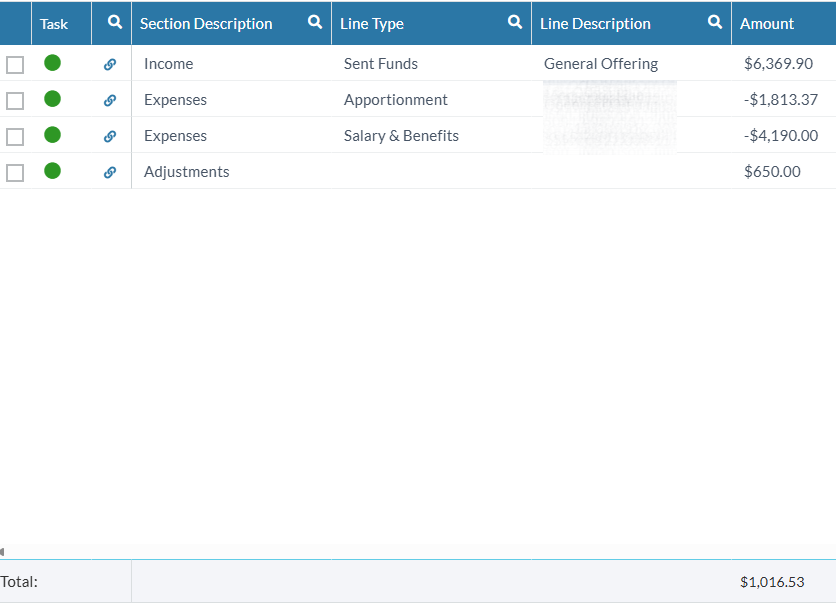
In this example, we have a net deposit, which means we will record this EFT as a deposit. This is more logical as we normally view income as positive and expenses as negative.
- Click the checking account to which the deposit is made.
- Select the date of the EFT.
- Describe the transaction, like “August EFT”.
- Put the net deposit amount in the Deposit column.
- Click the gear icon
- Click Split
- Record the Income lines as positive numbers to the appropriate category, in this case Personal Income: Donations for 6369.90 and Personal Income: Miscellaneous for 650.00.
- Record the Expenses lines as negative numbers to the appropriate categories, in this case Personal Expenses: Apportionment for -1813.37, and Pastor Salary and Benefits for -4190.00.
- Click OK to save the split.
- Press Enter to save the transaction.
By recording the EFT as a split transaction, your entry in Quicken will match your bank statement while the reports will show the correct categories for each income and expense.